
GujRERA lawyer account creation is required for every advocate or lawyer engaged by a promoter to provide legal certificates for a RERA-registered real estate project in Gujarat. Under the RERA Act, a lawyer must furnish the encumbrance certificate, title certificate, and title report for any project they are assigned to.
These activities are completed through the GujRERA RERA 2.0 portal and require an active Lawyer user account linked to a valid Bar Council registration.
Table of Contents
Before You Begin
Have the following ready before starting:
- Bar Council of India Registration Number (format:
COI/XXXX/XXXXXX) - State Bar Council Number — the portal auto-fetches all details once this is entered
- State Bar Council Enrollment Date (dd/mm/yyyy)
- Active email address and mobile number — both will receive OTPs during sign-up
- Communication address with a valid 6-digit pincode
Step 1: Open the Portal and Click Sign Up
Open https://gujrera.gujarat.gov.in/. Click the orange Login button at the top right. In the login modal, click Sign Up (for New Users).

Step 2: Enter Email, Mobile and Select Lawyer as User Type
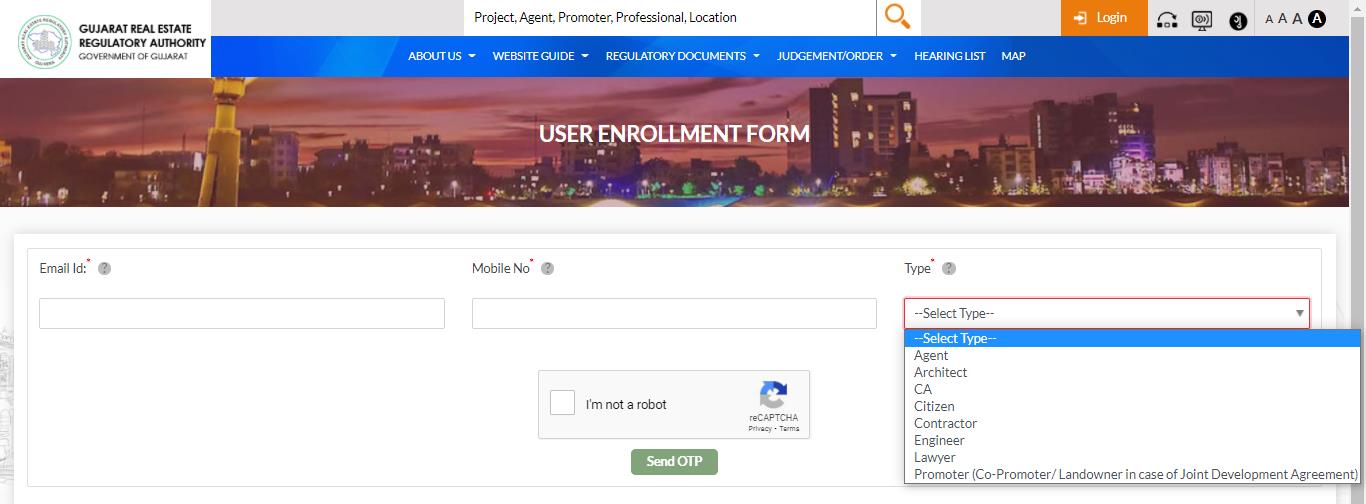
On the User Enrollment Form, fill in:
- Email ID* — your professional email; this becomes your login credential after account creation
- Mobile No* — active number that can receive SMS
- Type* — select Lawyer from the dropdown
Complete the reCAPTCHA and click Send OTP.
Step 3: Verify Your Email and Mobile via OTP
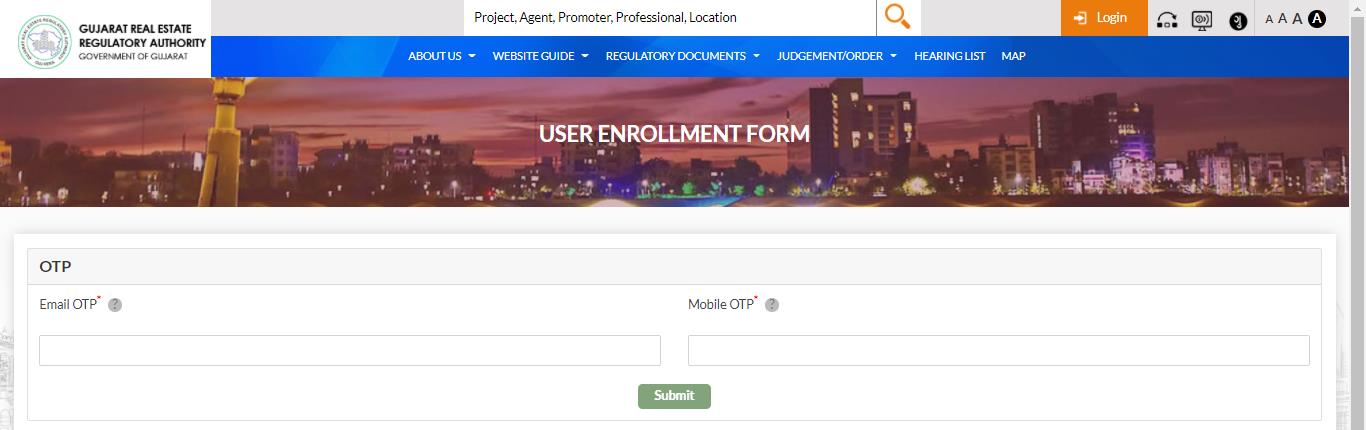
Two One-Time Passwords are sent — one to your email and one to your mobile. Enter both in the OTP verification screen and click Submit.
Step 4: Fill the Lawyer Enrollment Form
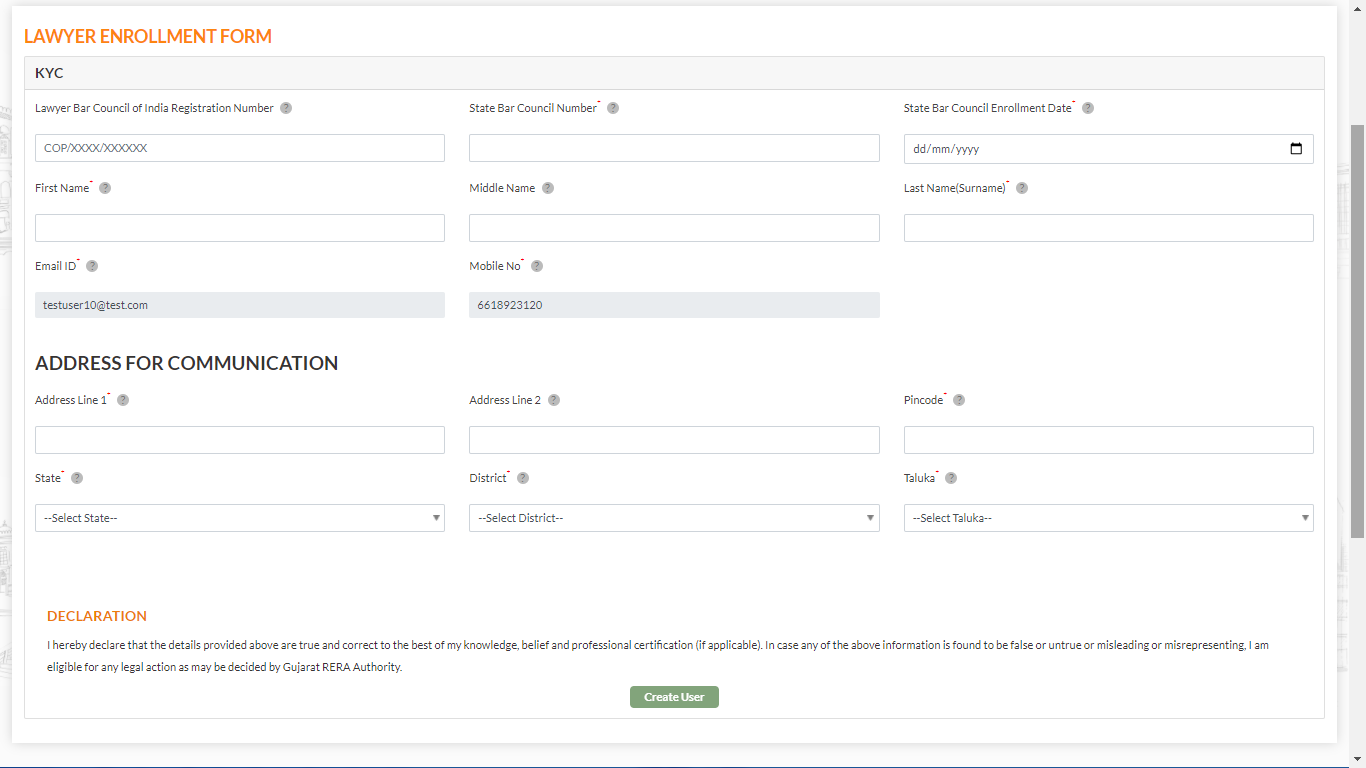
After OTP verification, the Lawyer Enrollment Form opens. Fill all mandatory fields (marked with *):
Bar Council Details:
- Lawyer Bar Council of India Registration Number* (format:
COI/XXXX/XXXXXX) - State Bar Council Number* — entering this auto-fetches your name and other details from the Bar Council records
- State Bar Council Enrollment Date* (dd/mm/yyyy)
Personal Details (auto-fetched):
- First Name*, Middle Name, Last Name (Surname)* — populated from State Bar Council Number
- Email ID* (pre-filled from Step 2)
- Mobile No* (pre-filled from Step 2)
Address for Communication:
- Address Line 1*, Address Line 2
- Pincode* — auto-fills State, District, Taluka
- State*, District*, Taluka*
Read the Declaration and click Create User.
After Submitting
Clicking Create User completes the Lawyer account creation. The account is activated immediately upon submission.
Your Lawyer User Account login credential is your Email ID — use it (along with your password) to log in to the GujRERA RERA 2.0 portal for all future project assignments.
What You Can Do After Logging In
Once your Lawyer account is active, a Promoter can assign you to a registered project. After assignment you can:
- Submit the Encumbrance Certificate — certify that the project land is free from legal encumbrances
- Submit the Title Certificate — confirm legal ownership and clear title of the project land
- Submit the Title Report — provide a detailed legal title report as required under RERA provisions
Common Issues
Bar Council number not recognized or details not auto-populating: Ensure the State Bar Council Number is entered correctly and that the corresponding Bar Council of India Registration Number is in the format COI/XXXX/XXXXXX. If the number is correct but details do not load, the Bar Council records may not be synced — contact GujRERA support.
Enrollment date mismatch: The State Bar Council Enrollment Date must match the date on your Bar Council enrollment certificate exactly. An incorrect date will prevent the form from validating.
Email or mobile OTP not received: Check your spam folder for the email OTP. Ensure the mobile number entered is active and can receive SMS. Both OTPs must be submitted within the session timeout.