
How to Pay RERA Penalties on GujRERA 2.0 Portal — Step-by-Step Guide

GujRERA penalty payment is done entirely online through the RERA 2.0 portal. When the GujRERA Authority issues a penalty order against a promoter, agent, or any other party, the outstanding challan appears directly in the My Penalties TAB on the user's dashboard — no manual challan download or bank visit is required.
Payments are processed through the official GujRERA 2.0 portal via SBI ePay or HDFC payment gateway.
Table of Contents
Before You Begin
- Log in to the GujRERA 2.0 portal with your registered credentials (Email ID or relevant login credential for your user type)
- Ensure the penalty order has been issued and a challan has been generated — the challan must appear in My Penalties TAB before you can pay
- For Corporate Net Banking (Maker-Checker-Approver flow): the entire approval chain must be completed within 30 minutes of initiating payment
Step 1: Go to My Penalties TAB on Your Dashboard
After logging in, go to your Dashboard. Click the My Penalties TAB.
The tab displays all outstanding and paid penalties in a table with the following columns:
| Column | Description |
|---|---|
| Complaint No. | The complaint number linked to the penalty |
| Judgement Number | The order/judgement reference |
| Challan No. | Unique challan number generated for payment |
| Project Name | The project against which the penalty was levied |
| Order Copy | Link to download the penalty order |
| Challan Generated Date | Date the challan was generated |
| Challan Amount | Total penalty amount on the challan |
| Outstanding Amount | Amount still pending (may differ if partial payments exist) |
| Challan PDF | Download the challan as a PDF |
| Pay | Button to initiate online payment |
Step 2: Click Pay and Review the Challan Popup
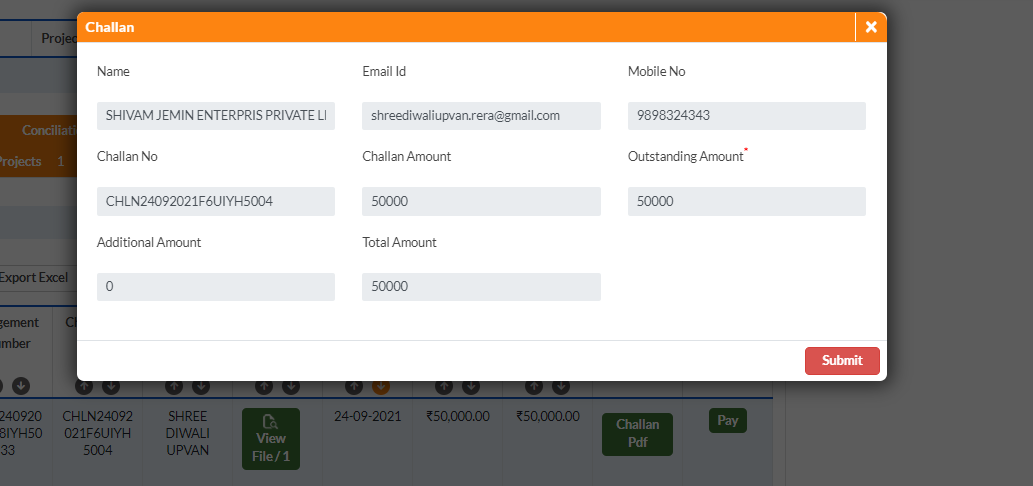
Click the Pay button on the row for the challan you want to pay. A popup appears showing the full challan details:
- Name — your registered name on the portal
- Email ID — your registered email
- Mobile No — your registered mobile
- Challan No — the challan reference
- Challan Amount — the base penalty amount
- Outstanding Amount — the amount currently due
- Additional Amount — any surcharge or interest added
- Total Amount — final payable amount (Outstanding + Additional)
Review all details carefully. Click Submit to proceed to the payment screen.
Step 3: Accept Terms and Pay via Gateway
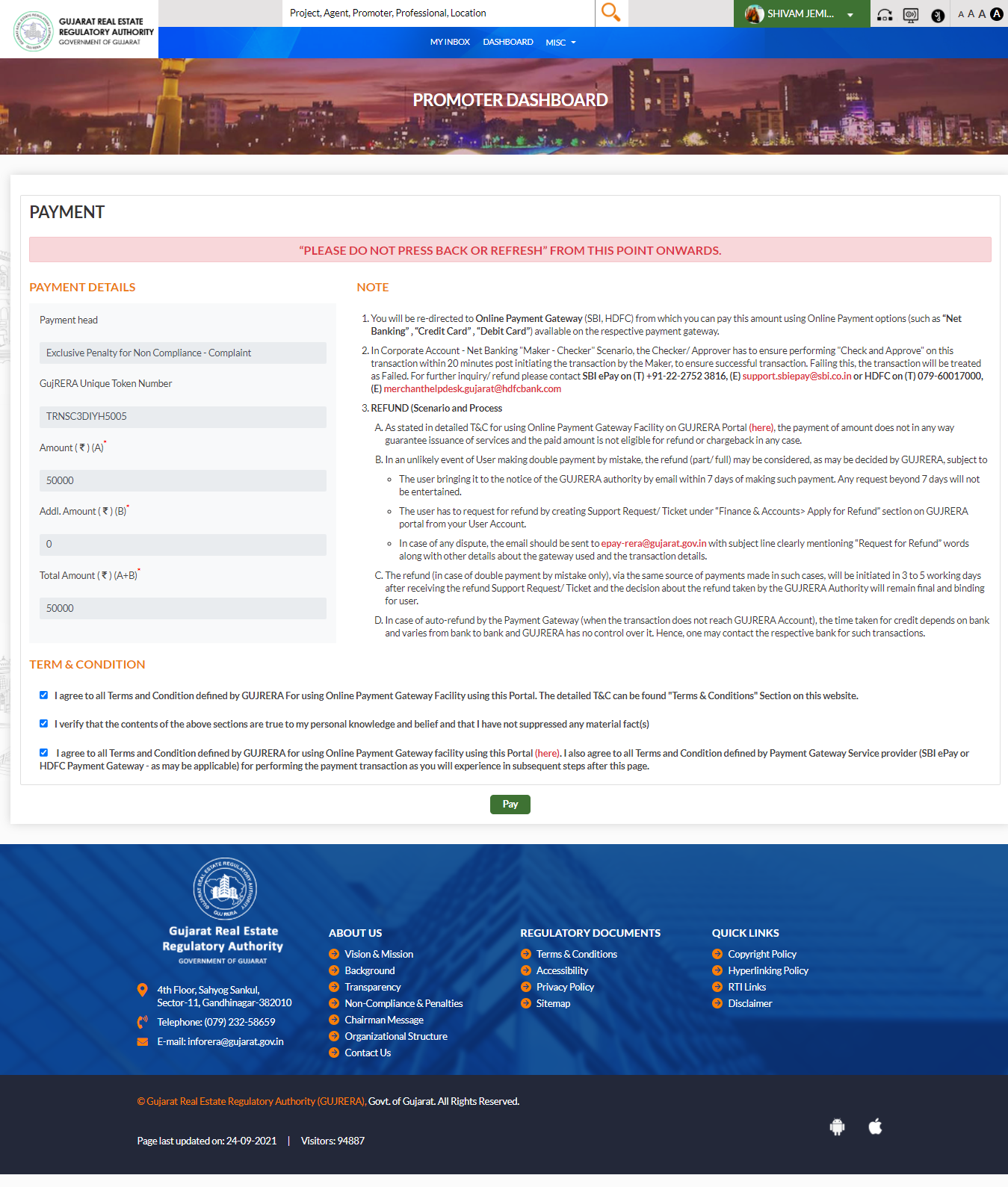
After clicking Submit, you are taken to the Payment screen showing:
- GujRERA Unique Token Number — the transaction reference for this payment session
- Amount (A) — base outstanding penalty amount
- Additional Amount (B) — surcharge or interest (if applicable)
- Total Amount (A+B) — the final amount to be paid
Read and tick all 3 Terms & Conditions checkboxes, then click Pay.
You are redirected to the online payment gateway — either SBI ePay or HDFC — where you can pay using:
- Net Banking
- Credit Card
- Debit Card
Corporate Net Banking — Maker-Checker-Approver Flow
If your organisation uses Corporate Net Banking, the payment involves a multi-user approval flow:
- Maker — initiates the payment transaction
- Checker — reviews and approves the transaction
- Approver — gives final approval for the payment to be processed
Important: The entire Maker-Checker-Approver sequence must be completed within 30 minutes of the Maker initiating the payment. If the flow is not completed within this window, the transaction expires and you must start again from the My Penalties TAB.
After Payment
Once payment is successful, the challan status in your My Penalties TAB updates. Save the payment confirmation reference number and the GujRERA Unique Token Number for your records.
Refund Process
If you have made a payment in error or if a double payment has occurred, follow the process below:
Step 1 — Raise a Support Request on the portal:
Go to Dashboard → Support Requests → Finance & Accounts → Apply for Refund. Fill in the refund request with your payment details and submit.
Step 2 — Send an email:
Email epay-rera@gujarat.gov.in with the subject line "Request for Refund". Include your:
- GujRERA Unique Token Number
- Payment gateway transaction reference
- Amount paid
- Date of payment
- Reason for refund (double payment, payment not linked to correct challan, etc.)
Refund timelines:
- Double payment: Refund initiated within 3–5 working days after your Support Request is verified
- Auto-refund (payment not reaching GujRERA account): Timeline depends on your bank's processing time
Payment Gateway Support Contacts
If you face issues during the payment gateway step (payment deducted but not confirmed, gateway error, session timeout), contact the respective gateway support directly:
| Gateway | Phone | |
|---|---|---|
| SBI ePay | 1-91-22-2752 3816 | support.sbipay@sbi.co.in |
| HDFC | 079-68017000 | merchanthelpdesk.gujarat@hdfcbank.com |
For portal-side issues (challan not appearing, penalty not updated after payment), raise a Support Request on your GujRERA dashboard or contact GujRERA at inforera@gujarat.gov.in or call (079) 232-58659.